
Virtual store software that pays for itself before rollout
Virtual store software exists to reverse that sequence. It brings the store into the room while decisions are still being shaped, not after they have been signed off. For large-format retailers running hundreds of sites, and for the FMCG suppliers negotiating for space inside them, this changes how planning works at an operational level. Not just what a planogram looks like on screen, but how a category reset gets approved, how a campaign is tested before rollout, and how disagreements between merchandising, marketing, operations and commercial teams get resolved before they become expensive.
How can virtual store software improve the way decisions move through an organisation?
The planning gap that tools alone do not close
Retail has no shortage of planning tools. Planogram software, space planning platforms, sales analytics, range optimisation models. The tools exist. The gap is not technological. It is organisational.
A category manager builds a planogram in a 2D tool. A visual merchandising team provides input by email. A supplier sends a proposed display unit as a flat render. Marketing reviews the promotional plan in a separate deck. Operations flags execution concerns after sign-off, when it is too late to change the layout without blowing the timeline.
Each team works in its own format, on its own schedule, against its own KPIs. The store itself, the actual space where all these decisions converge, is the one thing nobody can see clearly until physical execution begins.
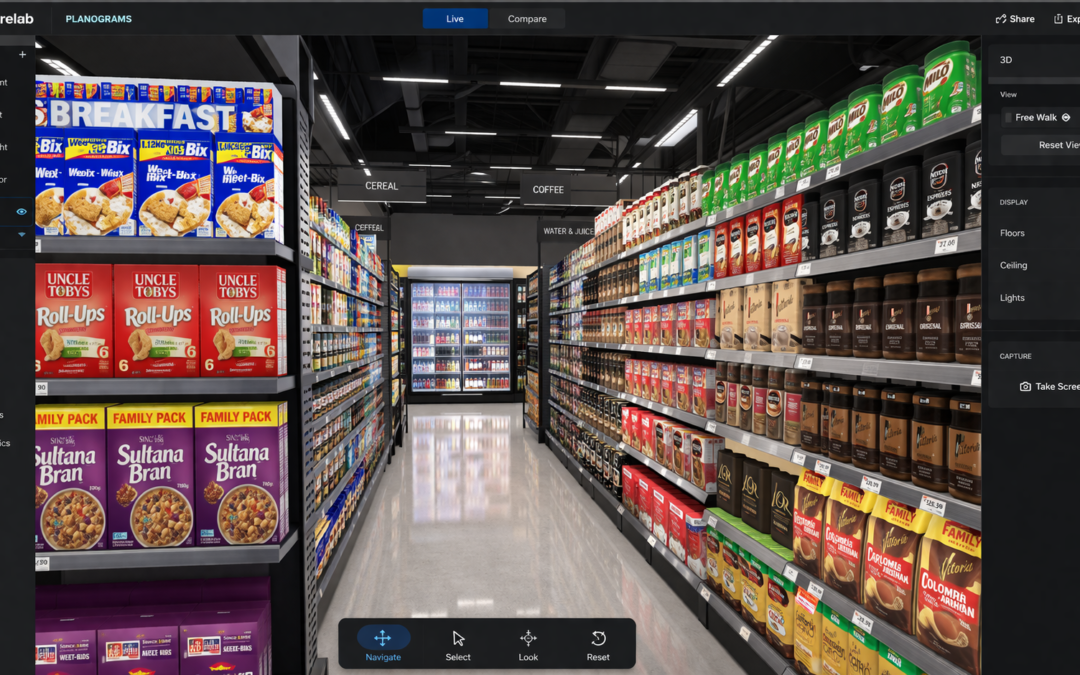
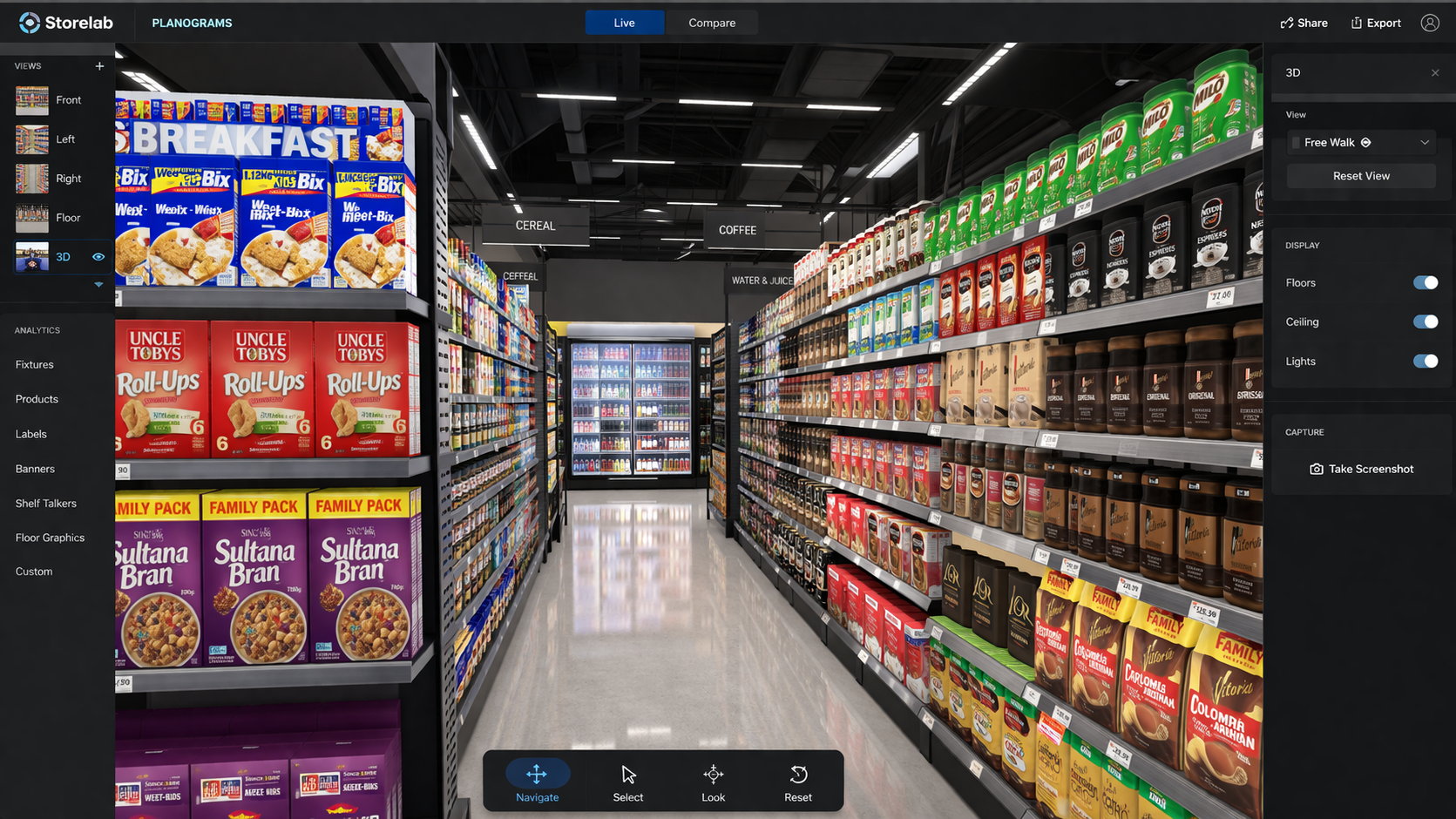
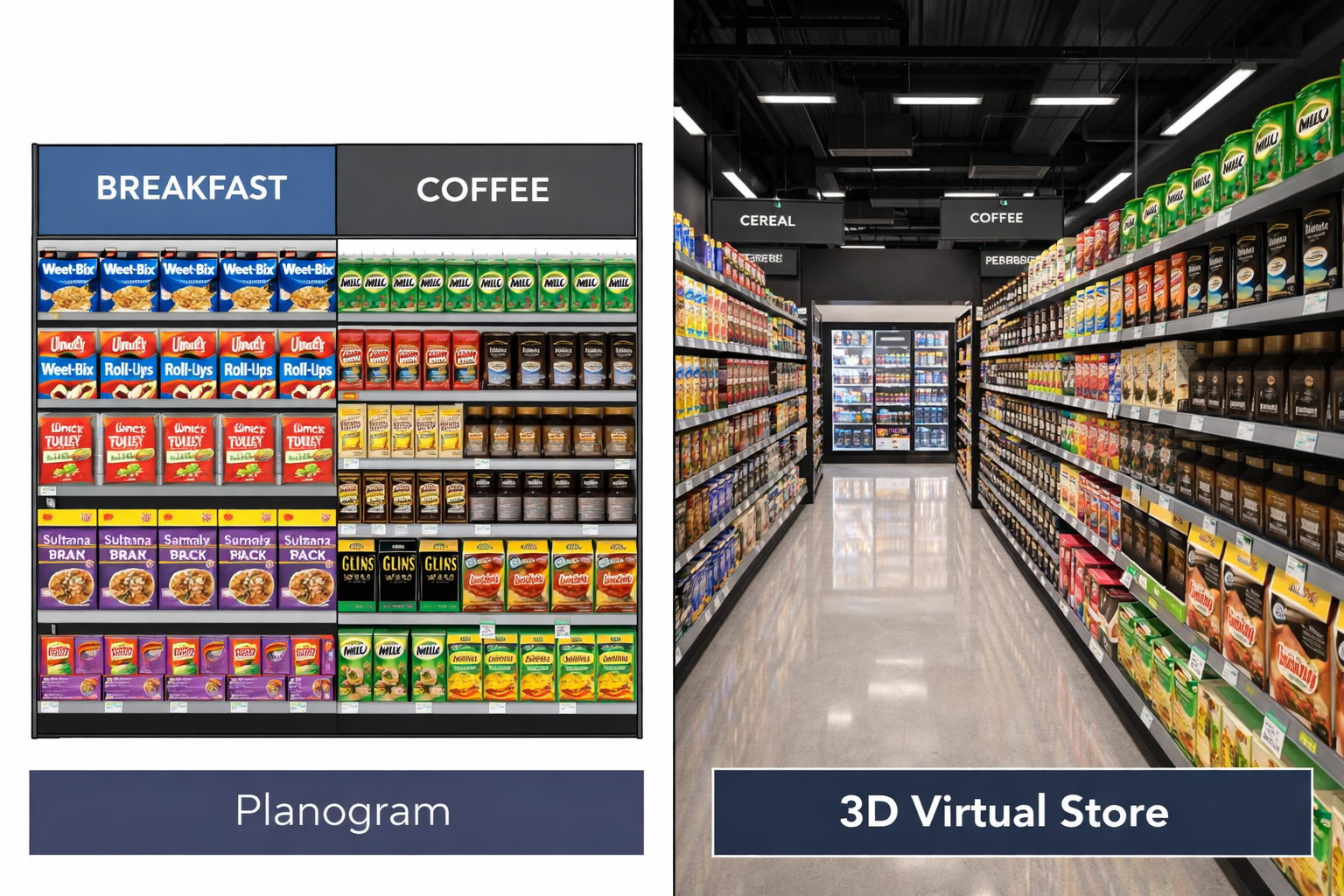
Virtual store software closes that gap by giving every stakeholder access to the same three-dimensional environment. Not a flat schematic. Not a photo of a mock-up taken in a warehouse. A navigable, photorealistic digital version of the store, built to the same dimensions, fixtures and sightlines as the real thing.
Platforms like Storelab Connect are designed specifically for this kind of shared environment, where merchandising, marketing, operations and suppliers can review and align in real time rather than in sequence.
What changes when the store is in the room
The shift is less about software features and more about what happens to the planning process when people can walk through a proposed layout together, in real time, before anything is built.
Three things tend to change.
Control Beats Realism
| Planning without virtual store software | Planning with virtual store software |
|---|---|
| Stakeholders review flat planograms and slide decks independently | Stakeholders walk through the same 3D environment together |
| Sightlines and spatial issues surface during or after physical rollout | Sightlines and spatial issues are visible before sign-off |
| Supplier presentations rely on renders and mock-ups | Suppliers present concepts inside a realistic store context |
| Approval requires multiple revision cycles | Alignment can happen in a single collaborative session |
| Field teams receive instructions they may interpret differently | Field teams can view virtual walkthroughs before execution |
Where this fits in the retail planning stack
Virtual store software is not a replacement for planogram tools, space planning systems or sales data. It sits alongside them. The distinction matters, because one of the most common misunderstandings is treating it as a visual upgrade to existing software rather than a different kind of tool with a different job.
Planogram software handles product-level shelf arrangement. It is precise, rules-based and built for category and merchandising teams. Store layout software manages floor plans, fixture placement and spatial allocation. Sales and inventory data inform ranging and replenishment decisions.
Virtual store software pulls these elements into a spatial context that can be experienced, reviewed and shared. It answers a different set of questions: does this layout make sense when you stand in the aisle? Can a shopper find the product from three metres away? Does the promotional zone compete with or complement the category it sits beside? Does this concept hold up across different store formats, or does it only work in the flagship?
| Tool type | Primary job | Typical users |
|---|---|---|
| Planogram software | Product arrangement at shelf level | Category managers, merchandising teams |
| Store layout software | Floor plan and fixture placement | Store design, development teams |
| Sales and space analytics | Performance measurement and range decisions | Commercial, category, insights teams |
| Virtual store software | 3D spatial review, testing and stakeholder alignment | Cross-functional: merchandising, marketing, operations, suppliers |
The practical test is straightforward: if a decision involves how something looks, feels or functions in the physical store environment, and if that decision affects multiple teams or needs to be communicated to people who were not in the planning room, virtual store software adds something that flat tools cannot.
Who uses it and what they use it for
The teams using virtual store software tend to be broader than those using traditional planogram or space planning tools. That breadth is part of the point. The software is most useful when it connects people who do not normally share a planning environment.
Typical use cases across a retail or FMCG organisation:
- Category and merchandising teams use it to test shelf layouts, ranging changes and category resets before committing to physical execution. A proposed reset can be reviewed in context rather than as a flat file.
- Visual merchandising and store design teams use it to evaluate fixture decisions, signage placement and store flow. Changes that look reasonable on a floor plan sometimes create problems that only become obvious in three dimensions.
- Marketing and campaign teams use it to plan promotional zones, seasonal activations and in-store communication. A virtual walkthrough can reveal whether a campaign element is visible from the aisle entry or buried behind a gondola end.
- Operations and field teams use it to understand what a rollout is supposed to look like before they build it. Virtual walkthroughs and training videos reduce the gap between head office intent and store-level execution. Tools like Storelab Fieldforce extend this further by giving field teams clear, visual guidance and reference materials to support consistent in-store execution.
- Supplier and brand teams use it to present proposals to retail buyers in a format that is harder to dismiss than a slide deck. Walking a buyer through a proposed shelf layout in a virtual version of their own store format carries more weight than a static render.
When virtual store software earns its place
Not every layout change or category decision needs to be tested in a virtual environment. The tool earns its place when the cost of getting a decision wrong is high, or when the number of stakeholders involved makes alignment difficult through traditional methods.
Situations where it tends to add the most value:
- Before a national or multi-format rollout. A layout that works in a large-format store may not translate to a compact format. Testing across virtual versions of different store types catches problems before they multiply across hundreds of sites. Dedicated environments such as Storelab Research allow teams to validate layouts, campaigns and shopper responses in a controlled virtual setting before committing to physical execution.
- Before a major category reset. A reset affects sightlines, adjacency, shopper navigation and often supplier relationships. Reviewing it in three dimensions rather than two reduces the risk of discovering problems at execution.
- Before a seasonal campaign or promotional launch. Campaign zones, point-of-sale materials and temporary fixtures need to work within the existing store environment. Virtual testing shows whether they do.
- When stakeholder alignment is proving difficult. If a decision has stalled because different teams have different expectations, putting everyone in the same virtual environment tends to move the conversation forward faster than another round of emails.
- When a refit or new store format is being planned. Virtual walkthroughs reduce the number of costly changes made after physical construction begins.
The common thread is that the decision is significant enough to justify testing before execution, and complex enough that flat documents are not giving people what they need to agree.
What to look for when evaluating virtual store software
For organisations considering virtual store software for the first time, or reassessing what they already use, a few practical questions cut through the noise:
- Can non-technical teams use it without specialist training? If only the 3D design team can operate the software, it will not change how planning decisions are made across the organisation. The value comes from broad adoption, not from a polished demo run by a specialist.
- Does it support real collaboration, or just presentation? There is a difference between software that produces a walkthrough video and software that lets multiple stakeholders interact with the environment, make changes and reach alignment in a working session.
- Can it model different store formats accurately? Australian retail operates across a wide range of formats, from large-format grocery to compact pharmacy and convenience. Software that only works well at one format size has limited usefulness for national operators.
- Does it produce outputs that are useful beyond the planning room? Training videos, compliance reference materials and supplier presentation assets extend the value of a virtual store environment well beyond the initial planning session.
- Does it integrate with existing planning tools and workflows? The ability to import planogram files, overlay performance data or connect to existing space planning systems determines whether the software adds value to the existing process or creates a parallel one.
The organisational shift, not just the technical one
Virtual store software is easy to evaluate as a technology purchase and harder to evaluate as an organisational change. But the organisational shift is where most of the value sits.
When a retailer moves from planning in flat files to planning in three-dimensional environments, the change is not just visual. It changes who is in the room during planning decisions, when problems become visible, how quickly approval cycles resolve, and how consistently stores execute what head office intended.
For FMCG suppliers, it changes the quality of the conversation with retail buyers. A proposal backed by a virtual walkthrough of the buyer’s own store format is harder to dismiss, easier to evaluate and more likely to lead to a productive negotiation than a flat render or a mood board.
None of this requires the technology to be perfect. It requires it to be good enough that people trust what they see, and practical enough that teams across the business can use it without waiting for a specialist to build the scene.
The retailers and suppliers getting the most from virtual store software are not the ones with the most advanced technology. They are the ones who have embedded it into how their teams plan, review and approve store decisions. The tool is the easy part. The shift in process is what creates the commercial difference.
Frequently asked questions
What is virtual store software used for in retail?
Virtual store software is used to build and review digital versions of retail environments before physical changes are made. Retail and FMCG teams use it for layout planning, category resets, campaign testing, fixture evaluation, supplier presentations and staff training. The core purpose is to test and align on store decisions before committing budget to physical execution.
Is virtual store software the same as planogram software?
No. Planogram software handles product arrangement at shelf level and is typically used by category and merchandising teams. Virtual store software is broader. It brings shelves, displays, fixtures, signage and store context together in a navigable 3D environment, making it useful for cross-functional planning, review and stakeholder alignment. The two tools complement each other rather than compete.
Who uses virtual store software in a retail business?
It is used across merchandising, category management, visual merchandising, store design, retail operations, marketing, and supplier-facing commercial teams. The breadth of users is part of its value, because it provides a shared reference point for teams that do not normally work in the same planning environment.
Can virtual store software help with store approvals?
Yes. One of the most common applications is reducing the number of revision cycles needed to reach sign-off on a layout, campaign or category change. When stakeholders can walk through a proposed layout together in a virtual environment, alignment tends to happen faster than when decisions are debated over flat documents.
When should a retailer consider using virtual store software?
It adds the most value before high-stakes decisions: national rollouts, category resets, seasonal campaigns, store refits and new format development. It is also useful when multiple stakeholders need to agree on a concept and when the cost of discovering problems after physical execution is high.
What should retailers look for in virtual store software?
Usability across non-technical teams, support for real-time collaboration (not just presentation), accuracy across different store formats, useful outputs for training and compliance, and integration with existing planning tools and workflows.